
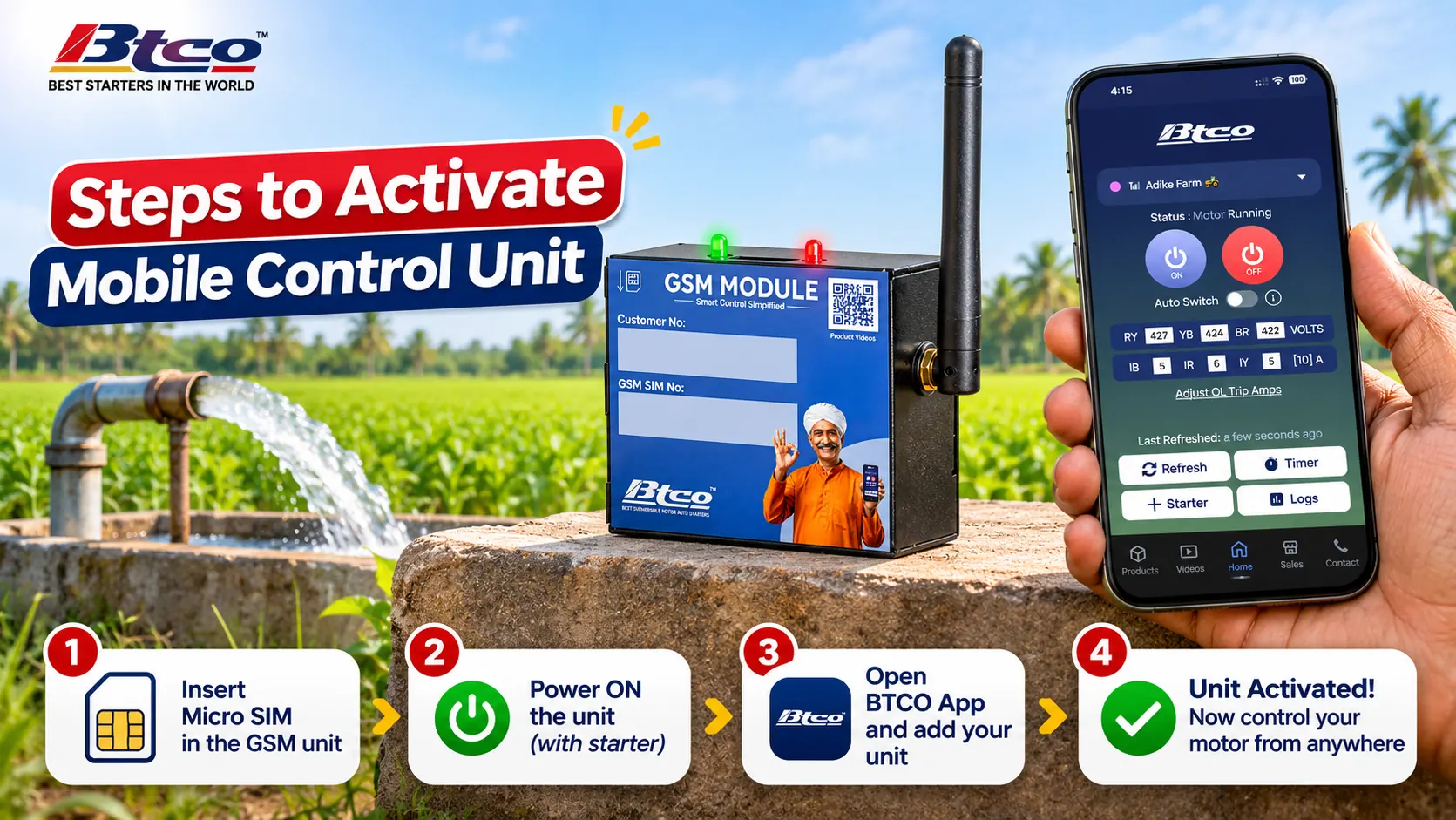
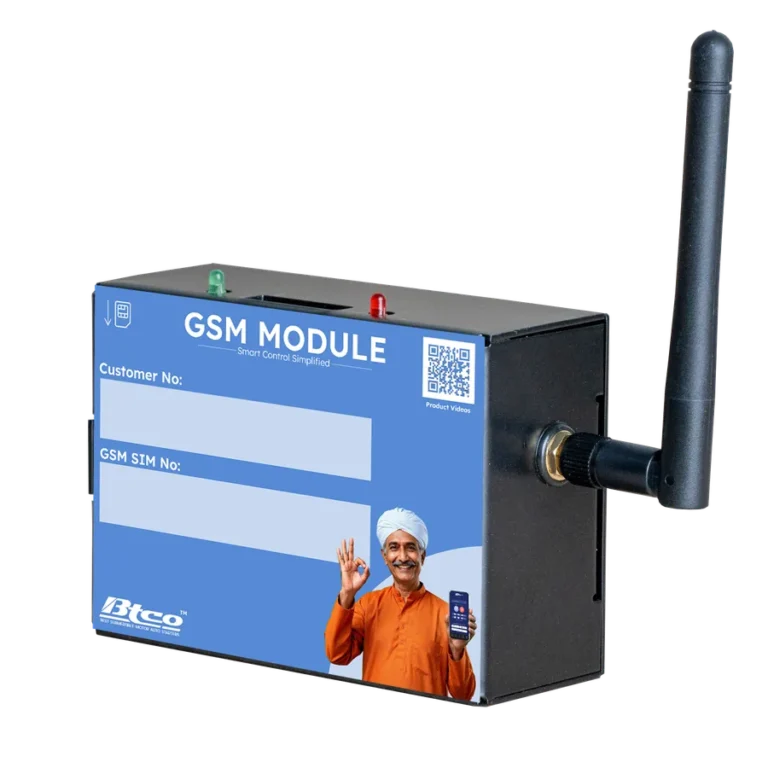
Bought a BTCO GSM Module (our Mobile Control Unit) and your app says “Activate GSM Module”? This guide shows the full setup in 6 steps: inserting the SIM card, connecting the wire and antenna, reading the indicator lights, and getting it activated by your dealer, usually within 10 minutes. After that you can switch your borewell motor ON or OFF from your phone, while your BTCO starter keeps doing its most important job: helping stop your submersible motor from burning.
GSM module activation in short
- Insert a micro SIM into the GSM module until it clicks.
- Join the GSM module to the middle port of the MPAU unit with the colour-coded wire.
- Fix the antenna on the right side of the module.
- Check the lights: green stays ON, red blinks fast.
- Ring the SIM number from your phone. If it rings, the network is good.
- Send the phone number of the SIM inserted into the GSM module along with your own phone number (operator number) to the dealer. When the app shows Healthy, you are done.
What you need before you start
The BTCO GSM Module goes by many names in shops and online: mobile starter, GSM mobile starter, mobile control starter, GSM motor starter, GSM motor controller, GSM pump controller, mobile auto starter, SIM card motor starter, 4G mobile starter and cell phone starter. In Kannada it is the ಮೊಬೈಲ್ ಸ್ಟಾರ್ಟರ್, and in Hindi people search for मोबाइल से मोटर चालू बंद. They all mean the same idea: a starter you control from your mobile phone.
To set up your BTCO one, keep these ready:
- A BTCO GSM Module, with its colour-coded wire and antenna. It works only with BTCO starters: DOL, star delta, Combined and single phase.
- A BTCO starter. The GSM module can be added to starters bought from January 2024. For older starters, call us or your dealer first.
- A micro SIM card with an active data pack and SMS pack. See which SIM to use below.
- The free BTCO Starters app on your phone, with your starter added (tap + Starter, then enter a name, the module’s SIM number and the starter type).
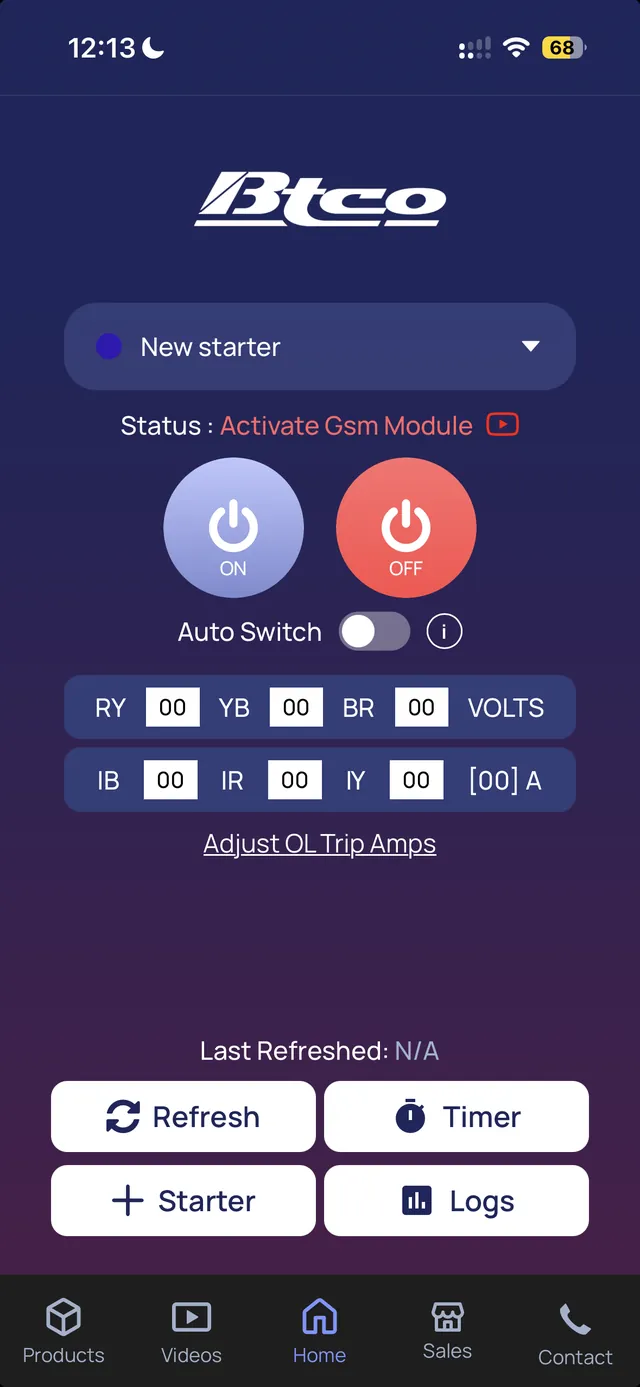
If you have never activated your GSM module, the BTCO app shows “Activate GSM Module” under Status:
If you are not comfortable opening the starter, ask your nearest BTCO dealer to do the connection for you.
How to set up the GSM module: step by step
Step 1: Insert the SIM card in the GSM module
Take a micro SIM, the medium-sized SIM, and push it into the SIM slot of the GSM module. You will hear a small click. That click means the SIM card is locked in place.
Step 2: Connect the GSM module to the starter
This is the whole mobile starter connection. Take the colour-coded wire that comes with the GSM module. Connect one end to the middle port on the MPAU unit inside your starter, and the other end to its port on the GSM module. Make sure both pins are fully inserted.
On a single phase starter, the port for mobile control is slightly inside, so take a little help from your dealer for this connection.
Step 3: Connect the antenna
Fix the antenna to the connector on the right side of the GSM module. The module uses this antenna to pick up the mobile network at your pump. The antenna stays on the GSM module, and the module can be placed on top of the starter.
Step 4: Check the green and red indicator lights
Once everything is connected and power is available, look at the lights on the GSM module:
| Light on the GSM module | What you should see | What it means |
|---|---|---|
| Green light | Stays ON | The GSM module is getting power |
| Red light | Blinks fast | Stable network: you can go ahead |
| Red light | Blinks slowly | No signal: fix this before activation |
Step 5: Check the network signal with a phone call
You can ring the GSM module just like a normal phone. From your regular mobile phone, call the SIM number that is inside the module. If it rings, the module is receiving the network properly. If it does not ring, activation cannot be done, so sort out the network first.
This call is only a network test. To run the motor, you use the BTCO app or SMS.
Step 6: Get your GSM module activated by your dealer
Send these two mobile numbers to your BTCO dealer:
- The phone number of the SIM inserted into the GSM module.
- Your own phone number (operator number).
Your dealer uses these details to activate the GSM module, usually within 10 minutes. Then open the Status section in the BTCO app. “Activate GSM Module” will be gone and the status will show Healthy.
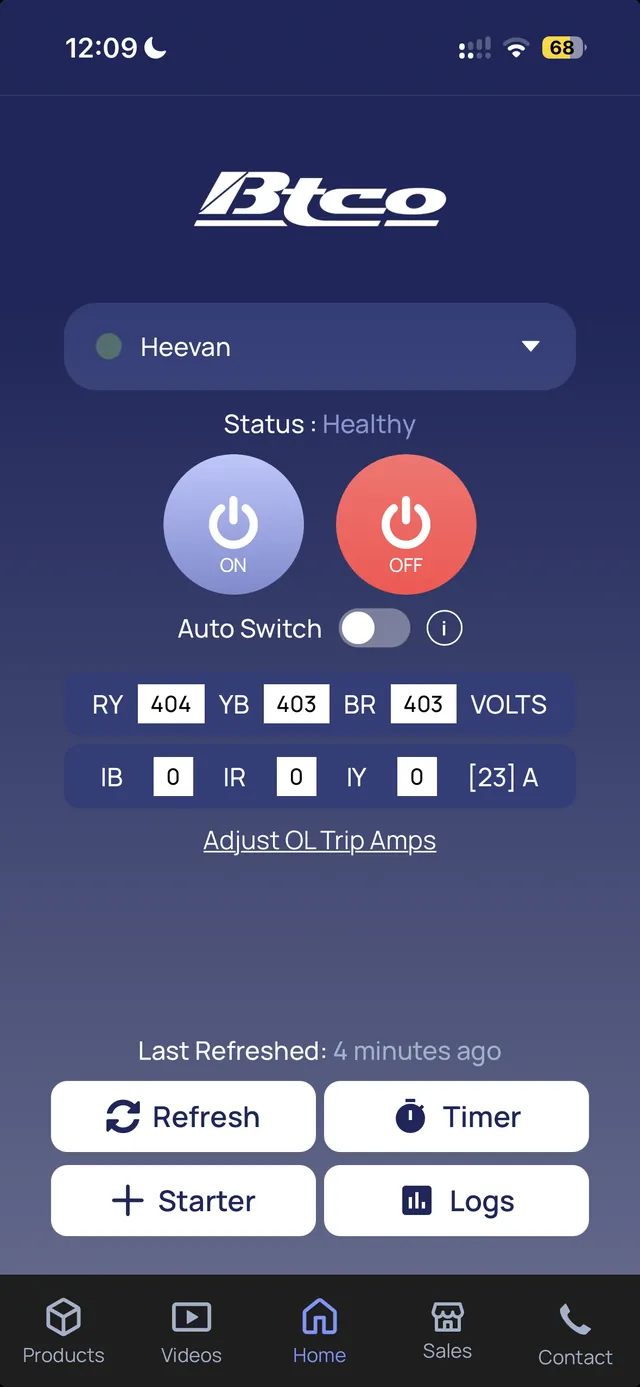
That’s it. Your mobile starter is ready, and you can start switching your motor ON and OFF from the BTCO app.
3 things that decide whether activation works
- Both the starter and the GSM module must have power during activation. Without power, activation cannot be completed. If you are on a farm feeder, do this while you have supply.
- The SIM card needs both an active data pack and an SMS pack. One without the other is not enough.
- Use a Jio or Airtel SIM. See below.
Which SIM card is best for a mobile starter?
For the BTCO GSM Module, we recommend Jio or Airtel. BSNL and Vodafone may also work, but they may not give the same network stability. If you are buying a new SIM card for your GSM module, choose Jio or Airtel.
Yes, the GSM module needs a SIM card. It works like a small phone at your pump, so it cannot work without one. Check the size too: it must be a micro SIM, the medium size. And before you buy, check which network actually works well at your borewell, because the module can only be as good as the signal at the pump.
| SIM question | Answer |
|---|---|
| SIM size | Micro SIM (medium size) |
| Pack needed | Active data pack and SMS pack |
| Recommended networks | Jio or Airtel |
| May work, less stable | BSNL, Vodafone |
GSM module not working? Quick checks
| What you see | What to check |
|---|---|
| Green light is not ON | The module is not getting power. Check that the starter has power and that both ends of the colour-coded wire are fully inserted. |
| Red light is blinking slowly | There is no signal. Check the antenna connection and that the SIM has clicked into place. A Jio or Airtel SIM usually helps. |
| The GSM module does not ring when you call it | Activation cannot be done until it rings. Check that the SIM is active and locked in, the antenna is fixed, and there is network at the pump. |
| App still shows “Activate GSM Module” | Check that the starter and module have power, that the SIM has both a data pack and an SMS pack, and that your dealer has received both numbers. |
Still stuck? Call your dealer or our office on 08162256789. For the status messages that appear on the starter itself, see our starter error messages guide.
Your mobile starter still protects the motor from burning
Switching a motor from your phone is convenient, but the bigger benefit is that your starter keeps protecting the motor while you are away. Your BTCO starter keeps its dry run, overload, single phasing and voltage fluctuation protection when you run it from the phone. These are the conditions that most often burn submersible motors, and the starter stops the motor when it sees them.
With the GSM module, you also get told about it. If the starter stops on a dry run trip or overload trip, the app sends an alert with the reason, so you are not left guessing or running a faulty pump again. You also get alerts for power cut and power restored, live voltage and current, 4 timer modes, and 7-day motor logs. See everything the free app can do, or read what a mobile starter is and how it works.
After activation: how to use your GSM mobile starter
- Motor ON or OFF from your mobile: tap ON or OFF in the app, or use SMS, from any distance, as long as there is network at the pump.
- Add family members: anyone who runs the motor can be added from Manage Users.
- Keep the SIM recharged: the module needs its data and SMS packs to stay active.
- Learn the app: our GSM module and app guide covers adding a starter, overload settings, timers and alerts.
How to set up the BTCO app and use mobile control: full video guide
Once your GSM module shows Healthy, these videos show you how to set up the BTCO Starters app and explain mobile control in detail. Pick your language.
Need a GSM module or a new mobile starter for your submersible pump? See which BTCO mobile starter you need, or ask your nearest dealer.
Questions farmers ask about GSM module setup
How do I activate my BTCO GSM module?
Insert a micro SIM, connect the module to the middle port of the MPAU unit with the colour-coded wire, fix the antenna, check that the green light is ON and the red light is blinking fast, and ring the SIM number to test the network. Then send the phone number of the SIM along with your own phone number (operator number) to your BTCO dealer. They activate it, usually within 10 minutes.
Why does my BTCO app show “Activate GSM Module”?
It means your GSM module has not been activated yet. Complete the setup and send the phone number of the SIM along with your own phone number (operator number) to your dealer. After activation, the status in the app changes to Healthy.
Which SIM card is best for a mobile starter or GSM module?
For the BTCO GSM Module, we recommend Jio or Airtel. BSNL and Vodafone may also work, but they may not give the same network stability.
Does a GSM module need a SIM card?
Yes. The GSM module works over the mobile network, so it needs a micro SIM with an active data pack and SMS pack.
What does the red light blinking on the GSM module mean?
A red light blinking fast means the network is stable. A red light blinking slowly means there is no signal. The green light should stay ON, which shows the module is getting power.
Where do I place the GSM module and antenna?
The antenna stays fixed on the GSM module, and the module can be placed on top of the starter.
How long does GSM module activation take?
Usually within 10 minutes after your dealer gets the phone number of the SIM and your own phone number (operator number). The GSM module must ring when you call it, or activation cannot be done. The starter and the GSM module must both have power during activation.
Why is my GSM module not working?
First check the lights. If green is not ON, check power and the colour-coded wire. If red is blinking slowly, there is no signal, so check the antenna and the SIM. If the module does not ring when you call it, activation cannot be done until the network is fixed. Also make sure the SIM has both a data pack and an SMS pack. If it still does not work, call your dealer or BTCO on 08162256789.
Can I control my motor by SMS without the app?
Yes. You can switch the motor ON or OFF by SMS. GSM modules bought before August 2025 work by SMS only; newer ones work with both the app and SMS.
Can I add a GSM module to my existing BTCO starter?
Yes, for BTCO starters bought from January 2024 onwards. For older starters, call us or your dealer first. The GSM module works only with BTCO starters.
Will my motor stay protected when I run it from my phone?
Yes. Your BTCO starter keeps its dry run, overload, single phasing and voltage fluctuation protection, which helps stop the motor from burning, and the app tells you the reason for a trip.
Is the BTCO Starters app free?
Yes, it is free for life, with no subscription fee. On Android, get it from Google Play. On iPhone, use the BTCO web app in your browser.
Where can I buy the BTCO GSM module?
At all BTCO Starters dealers. Find your nearest dealer on our sales and service centres page, or call 08162256789.
More videos on our videos page. Follow BTCO Starters on YouTube, Instagram and Facebook.